Skip to content
IP audio networks for broadcast are built on multicast, WheatNet IP audio included. Ethernet switches do not natively manage multicast traffic. They send multicast packets to every port on the switch, whether the devices connected to those ports requested streams or not. When more traffic arrives at the port than the device can handle, flooding occurs and that results in audio dropouts or complete loss of audio.
For this and other reasons, managed switches are best for broadcast. These Ethernet switches have control, security, and monitoring features that unmanaged switches lack. Among the most important are two key IGMP (Internet Group Management Protocol) features for managing audio packets: IGMP Snooping and an IGMP Querier.
IGMP Snooping and Querier
As the name implies, IGMP Snooping is what detects the presence of multicast traffic. The IGMP Querier is essentially the traffic cop that manages the multicasts; as a port requests a particular multicast stream, the querier allows the traffic through. When the device connected to the port no longer needs that audio, the querier cuts traffic off. Considering that each stream in a WheatNet IP audio network is going from point A to point B in 1/4 ms packets and with 30 or 40 I/O Blades and hundreds of I/O points in the network, snooping and querier features are almost a given for mission-critical broadcast operations.
Properly set up, a network switch with IGMP can support thousands of audio channels without congestion. IGMP features in the switch manage the distribution of multicast audio packets across the WheatNet IP system, which utilizes RFC standards initially developed for VoIP applications to synchronize and distribute packetized audio between Blades, console processing, and PCs.
As an aside, WheatNet IP continually prunes unused source groupings from the network so you don’t run out of switch capacity or have to spend time deleting unused channel assignments.
One or two central Gigabit Ethernet switches can generally service a few studios, a few consoles, and basic I/O between them. We strongly advise isolating the IP audio network on separate switches rather than putting critical studio traffic on the same general office network. You can also use a VLAN on existing switches to segment the network.
Switch for Redundancy
For larger multi-studio systems, our Phil Owens recommends setting up a central core stack of switches in the TOC with edge switches at each studio or group of studios if possible.
There are two good reasons to do this:
First, should a studio lose connectivity with the central stack for any reason — fire in the TOC, flood, power outage — individual studios can continue to operate independently via their local switches.
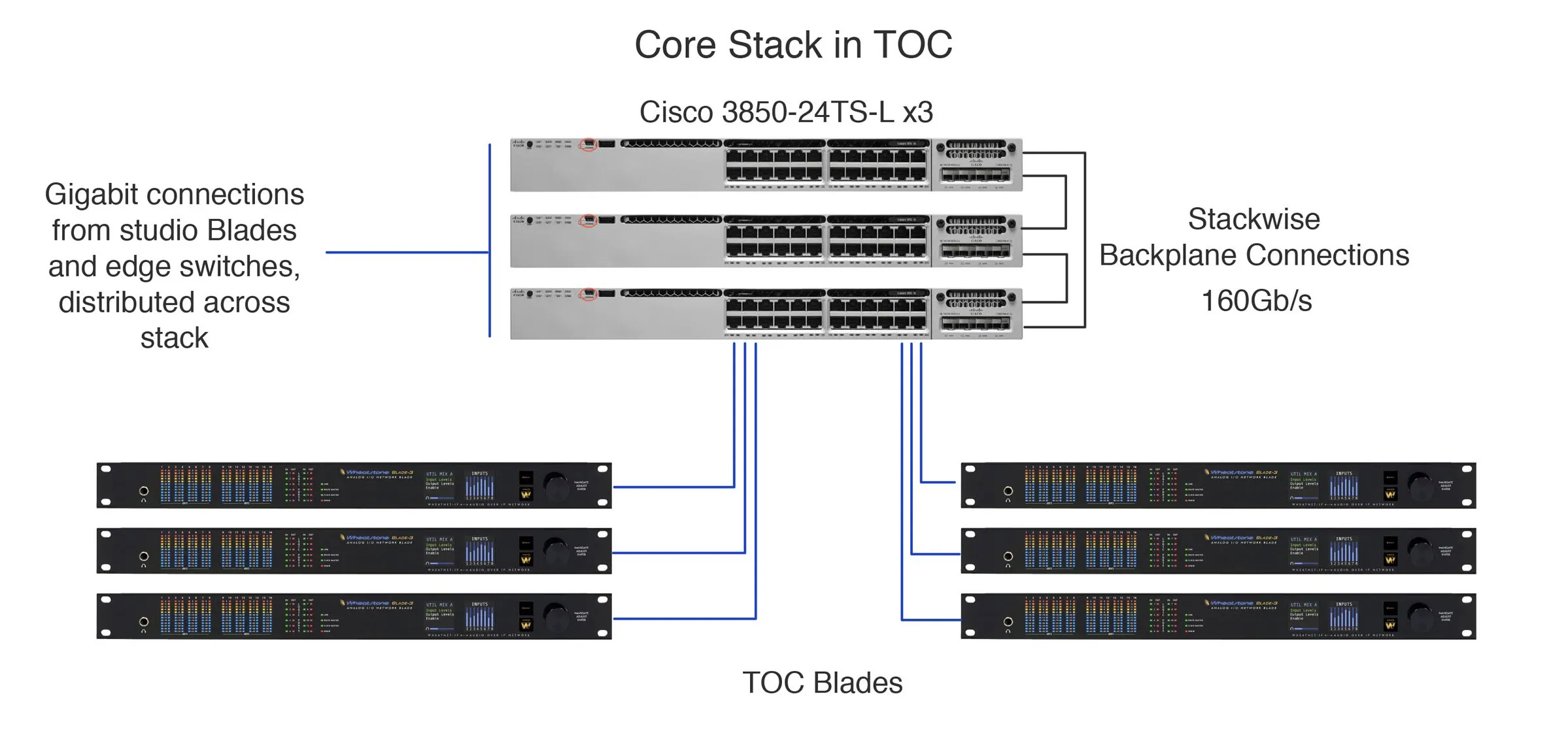
Cisco has a topology called Stackwise, where the back planes of multiple switches in a TOC, for example, can be joined at very high bandwidth (somewhere on the order of 160-gigabits-per-second links) in a daisy chain configuration, as shown above.
If any one of the switches should drop out of the stack, the other stack members can still communicate with each other.
The other reason to set up core switches in the TOC and edge switches in studio groups is that with all local I/O handled by the edge switches, you cut down the number of “home runs” from the studio to the central core stack and therefore have more efficient networking and traffic control.
When buying switches, it’s best to stick with one brand, especially for stack configurations.
We have tons of information on networking in our Support and Knowledge Base Portal, including a list of Approved Ethernet Switches for WheatNet IP, and several documents from our Studio Master Class webinar series, plus a Studio Planning Guide that has other helpful information.